Blender is best free video editing software with full feature like premium feature, for download Blender free video editing software just go to www.blender.org, its 100% free forever. Kali ini saya ingin berbagi tutorial blender tentang dasar dasar untuk video editing.
1. You must download blender free video editing software, if you not download how can to use that.
just go to www.blender.org
2. You must instal blender free video editing software in your pc or laptop, you cannot use this software if you not install belnder free video editing in your pc or you install but not use pc or laptop, example you install in playstation.
3. After instal blender free video editing software, you must open it. if you not open you will never know how to use that or after install you just uninstall again .
4. After open Blender software now follow instruction with image. this ismage is fisrt time you open blender free video editing software in default mode
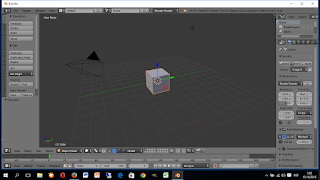 5. Then just change mode default to video editing, see the picture.
 just click this icon, see my cursor
 and then you will see in video editing mode

5. How to add video to blender free video editing ?
just follow my image instruction , first just click add and movie
 and than you see like this
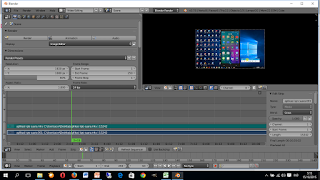 after that press home, it will give full length and setting you frame same like your video
after this you can edit as you llike use all feature, this is only basic.
Now how to save video, before you save you need setting propertis
just go to properties and just use this setting
Display : keep UI
Dimension : HDTV 720 for youtube or HDTV 1080
Frame rate : same like your video, just see in properties video
File format : XVID,
Preset : XVID
Audio coded : MP3
and then go to output then save. done
1. You must download blender free video editing software, if you not download how can to use that.
just go to www.blender.org
2. You must instal blender free video editing software in your pc or laptop, you cannot use this software if you not install belnder free video editing in your pc or you install but not use pc or laptop, example you install in playstation.
3. After instal blender free video editing software, you must open it. if you not open you will never know how to use that or after install you just uninstall again .
4. After open Blender software now follow instruction with image. this ismage is fisrt time you open blender free video editing software in default mode
5. How to add video to blender free video editing ?
just follow my image instruction , first just click add and movie
after this you can edit as you llike use all feature, this is only basic.
Now how to save video, before you save you need setting propertis
just go to properties and just use this setting
Display : keep UI
Dimension : HDTV 720 for youtube or HDTV 1080
Frame rate : same like your video, just see in properties video
File format : XVID,
Preset : XVID
Audio coded : MP3
and then go to output then save. done